
Delete your account and data
You can delete your account from inside any of our apps, or ask us to do it for you. This page explains where to find the option, what gets removed, and what we are required to keep.
Last updated August 2026
Deleting your account is permanent. Your progress, virtual items and purchase entitlements are removed and cannot be restored, even if you reinstall or sign up again with the same email address.
01Delete it in the app
Every one of our apps — Surveys Queen, Cash Queen, Lucky Queen, Puzzles Queen, Dice Queen, Ludo Queen and instaBucks — has an in-app deletion option. The exact wording varies slightly between apps, but the route is always the same:
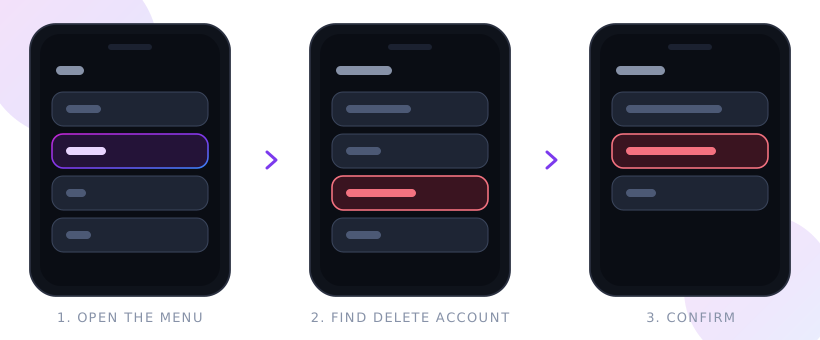
- Open the menu. Tap the menu, profile or avatar icon — usually in a corner of the home screen, or in the bottom navigation bar.
- Go to Settings or Profile. Depending on the app this is labelled Settings, Profile, Account or My Account.
- Choose Delete account. It sits with the account options, usually near Log out, and is normally shown in red.
- Confirm. We ask you to confirm because the action cannot be undone. Some apps ask you to re-enter your password or re-authenticate first.
If you cannot find the option, make sure the app is updated to the latest version from the App Store or Google Play, then use the email route in Section 3.
02If you signed in with Google, Facebook or as a guest
How you signed in changes what you should do, and what we are able to verify.
Email and password
Delete in the app, or email us from the address on the account. This is the easiest to verify, so it is the fastest route.
Sign in with Google
Delete in the app. Afterwards, remove our access at myaccount.google.com › Data & privacy › Third-party apps. Removing access there alone does not delete your data with us.
Log in with Facebook
Delete in the app. Afterwards, remove our app under Settings › Apps and Websites on Facebook. Again, removing it there alone does not delete your data with us.
Guest or anonymous play
Use the in-app option before you uninstall. A guest account is tied to the app installation and holds nothing that identifies you, so once the app is removed we usually cannot find or verify it.
Guest accounts: because an anonymous account contains no verified identifier, we are generally unable to confirm that it belongs to you. That means we may not be able to action a deletion request for a guest account after the app has been uninstalled. Deleting the app removes the local data from your device; the anonymous record on our side then expires under our normal retention schedule.
03Ask us instead
If you cannot access the app, or you would rather we did it, email support@casheeno.com with the subject “Account deletion request”, and tell us:
- which app or apps the request covers;
- the email address, username or player ID on the account; and
- how you signed in — email, Google, Facebook or guest.
Please send it from the email address registered to the account where you can. We may ask you for further information to verify the request, because we must not delete someone else’s account on an unverified request.
We action verified requests within 30 days, and sooner where the law that applies to you requires it. We will confirm by email when it is done. There is no charge.
04What gets deleted
Once a deletion is processed we remove, from our live systems:
- your account record, username, avatar and any profile or survey answers;
- your email address and authentication identifiers, including the Google, Facebook or anonymous identifier linked to the account;
- game progress, levels, streaks, rankings and statistics;
- virtual currency, coins, tokens and every other in-app item;
- your multiplayer match history and any chat messages attributable to you; and
- support tickets and correspondence, unless an open dispute requires them.
Deleted data is removed from live systems immediately and is overwritten in encrypted backups during the normal backup cycle, within 90 days.
05What we have to keep
A small amount of data must be retained even after deletion, because the law requires it or because we need it to protect other players. We keep the minimum necessary, and we do not use it to contact you or to build a profile:
- Purchase and tax records — transaction records are retained for the period required by accounting and tax law, commonly 6 to 8 years.
- Prize draw records — where you have entered or won, records needed to show the promotion was run fairly and to meet tax obligations.
- Fraud, cheating and safety records — where an account was suspended for cheating, fraud or abuse, we keep a limited record so the ban cannot simply be reset by deleting and re-registering.
- Legal claims — anything needed to establish, exercise or defend a legal claim, until the relevant limitation period expires.
- Aggregated and anonymised statistics, which no longer identify you and are not restored to an identifiable form.
Our privacy policy sets out the full retention schedule.
06Before you delete
- Purchases are not refunded. Deleting an account does not refund anything you have bought. Refunds are handled by Apple or Google under their own policies, so raise those with the store before deleting.
- Virtual items are forfeited. Coins, tokens and unlocks are removed and have no monetary value, so nothing is paid out for them.
- Each app is separate. Deleting your account in one app does not delete it in the others. Tell us in one email if you want all of them removed.
- Uninstalling is not deleting. Removing the app from your device does not delete your account on our side unless it was a guest account.
- Pending prizes are lost. If you have won a prize that has not yet been released, claim it before you delete.
If you only want to stop marketing emails, or to turn off personalised advertising, you do not need to delete your account — see our privacy policy for those controls.